otoMate SystemsTaskflowby otoMate Systems

Clio tasks,
superpowered

Three things a fixed task list can’t do, all dynamic: the list itself branches on the matter’s own fields, every due date counts off your real calendar, and each assignee is decided by a rule, not typed in.

Read the docs
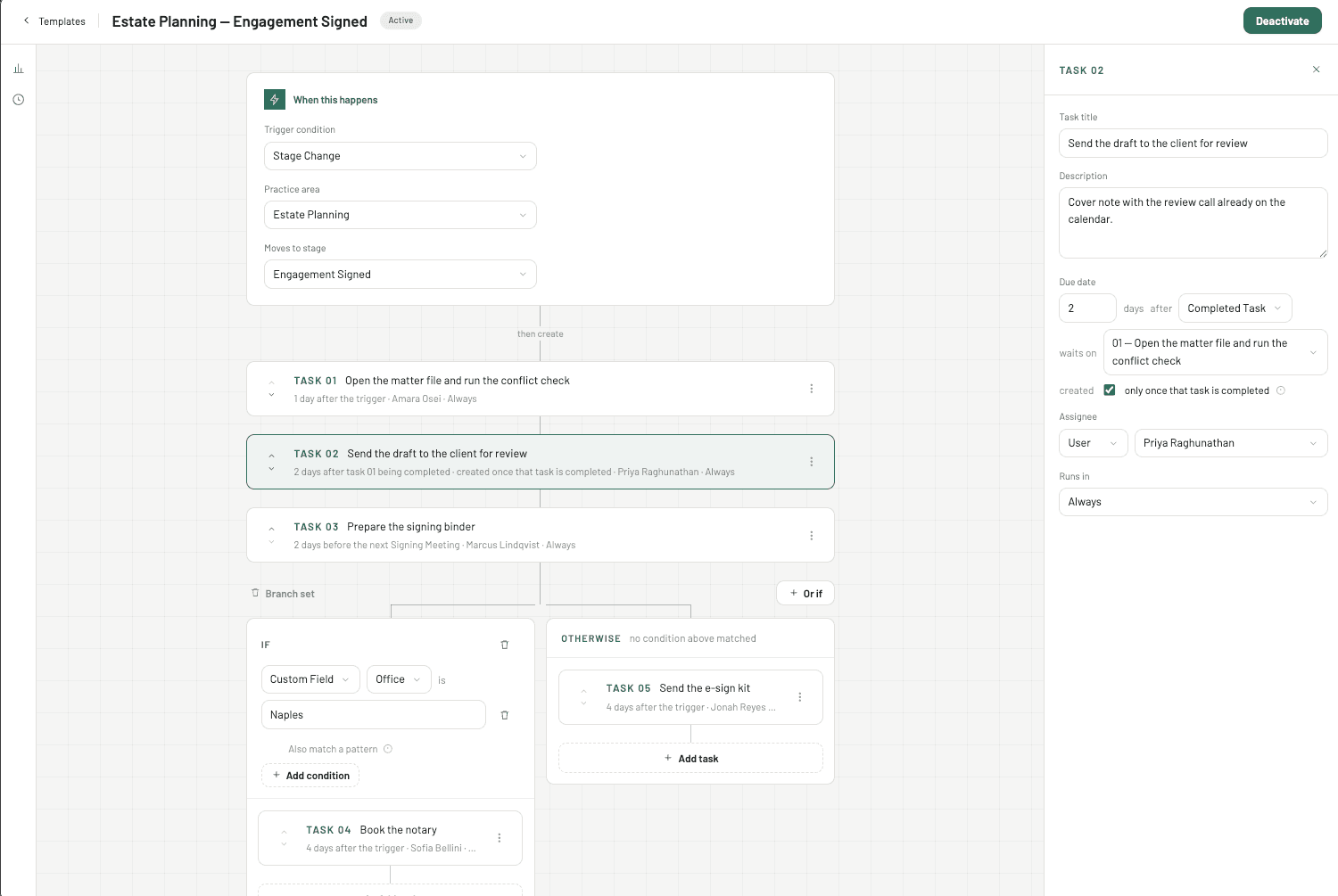
Taskflow template builder: trigger, task list, branch set and the task detail panel

For Clio

Matter stages and calendar events trigger whole task lists into Clio, branched by matter fields, dated around your firm's real calendar, assigned by rules that read like sentences.

Last runSuccessful
Drafting → 13 tasks
matter 1000000482 · Aug 31, 5:58 PM
✓Open client fileSep 18
✓Prepare meeting packetSep 15
✓Draft engagement letterSep 21
✓Send confirmation emailSep 16
Post-run check clean13 created · 0 failed
What it wrote into Clio
✓Prepare meeting packetSep 15 · M. Reed
✓Send confirmation emailSep 16 · J. Calma
✓Open client fileSep 18 · M. Reed
✓Draft engagement letterundated · waits on TASK 03
✓Update matterSep 21 · rolled off Sunday

For Other CRMs

Custom features, or a different CRM: quoted after a call. We've wired the same engine to systems other than Clio.

ReferenceIntake owner (by office) · Active
Rule 1
When Event Type is “Closing Meeting” and Event Location contains “Northside”
→ goes to Marcus Reed
Rule 2
When Matter Location is “Riverside Office”
→ goes to Priya Anand
Rule 3
When Attendee contains “Tom”, any one attendee matches
→ goes to Sam Ortega
Fallback
And if none of the above, whoever is responsible for the matter — required, and cannot be deleted
→ goes to Responsible attorney
How it works

Two triggers. Everything else is your rules.

A matter reaches a stage, or an event of a type lands on a calendar. Taskflow reads the matter, works out the whole list, and writes it into Clio, or in dry run shows you what it would have written.

From Clio
Intake
Drafting
Review
Closed
the matter just moved here
or
SEP18a Closing Meeting was booked
the other trigger
and later
✓a task was ticked done
not a trigger: it dates the waiting tasks
01The trigger

Clio tells us something moved

A matter enters a stage, or an event of a type you picked lands on a calendar. Those are the only two triggers, deliberately. After that, Clio also tells us when a task is ticked done.

Taskflow decides
If Estate Planningwins
3 dated · 1 waits on TASK 02
Else Probateskipped
named on the run, not silent
due datesassignee rules
02The decision

Taskflow works out the list

Branches pick the tasks. Due dates count off the trigger, the event, or another task in the list being ticked done. Rules pick the assignee.

Into Clio4 tasks
15161821on tick
undated until the task it waits on is ticked done
03The result

Tasks land in Clio, dated and owned

A task waiting on another is created with no due date, and gets one the moment that task is ticked done, un-tick it and the date is taken away again. In dry run, nothing is written at all.

Dynamic Task Lists

One template, a different list per condition.

Split a group of tasks by if / else-if / otherwise on any matter field or firm custom field. A losing branch isn’t silent: the run names the tasks that didn’t run, and why.

AND within one branchMatter fields and firm custom fieldsNo nesting, on purpose
Task groupOpening tasks · reads Practice Area
IfPractice Area is “Estate Planning” AND Matter Status is Open
01Draft will: first pass02Order records search03Schedule closing meeting
This branch won. Three tasks created.
Else ifPractice Area is “Probate”
01File opening petition02Notice to interested parties
Skipped: condition did not match.
OtherwiseAnything else
01Partner review: unmatched matter
Not needed this run. The run says so, by name.
Dynamic Due Dates

Three days means three days. It just can’t land on a closed day.

Counting is on the wall calendar, weekends included. Your working week, office closures and one person's leave only decide where a date may land, and it moves by the least it can.

3 days after the closing meetingMeeting: Thu 17 Sep
Thu
17
the closing meeting
Fri
18
day 1
Sat
×
19
day 2 · closed
Sun
×
20
day 3 · closed
Mon
21
due here
Tue
22
LandedCounted to Sun 20 Sep, a closed day, so it rolled forward to Mon 21. Counted before something, it would have rolled back instead.
419
Timezones
Dates are the ones your firm’s own calendar day shows, not UTC’s.
Undated
Tasks that wait on a task
Created in Clio with no due date, dated the moment somebody ticks the task it waits on. Un-tick it and the date is taken away again.
0–300s
Grace period
A mis-set stage or mis-booked event can still be corrected. 0 turns it off.
Dynamic Assignees

Rules that read like sentences.

Read top to bottom; the first rule that matches wins. Anyone in your Clio account can be an assignee: nobody has to sign into Taskflow first, and there's no mapping step.

ReferenceReads Matter Location off the matter
Intake owner (by office) · Active
Rule 1When Event Type is “Closing Meeting” and Event Location contains “Northside”→ goes to Marcus Reed
Rule 2When Matter Location is “Riverside Office”→ goes to Priya Anand
Rule 3When Attendee contains “Tom”, any one attendee matches→ goes to Sam Ortega
FallbackAnd if none of the above, whoever is responsible for the matter — required, and cannot be deleted→ goes to Responsible attorney
When nothing matches, the run creates one “Could not generate task list” task naming the field that was empty, not a whole list on the fallback.How matching works →
Everything in the box

Built by people who have watched a firm key in the same nine tasks forty times a week.

01Templates

A library your admin can actually run

Create, rename, delete and filter templates by status, trigger or reference
One folder per template; deleting a folder never deletes templates
Draft / Active / Inactive, only Active fires
Publish is refused while a template is incomplete, and the builder says which field
02Triggers

Two triggers, on purpose

Stage change: pick a practice area and a matter stage
Calendar event: pick an event type from your own Clio list
A stage change also reads the 25 soonest events booked on that matter
Reschedule an event and the tasks already in Clio are re-dated in place
03Safety

Nothing is created until you say so

Dry run on by default, firm-wide
Grace period of 0–300 seconds from the trigger
Test-matter gate that fails closed
Clio rate limit respected, pauses, resumes, records only what landed
04Assignees

Straight from Clio, no mapping step

Rules read as sentences; first match wins
Read matter fields, firm custom fields or calendar-event fields
contains / starts with / ends with / is exactly, regex as the escape hatch
A fallback is required, Clio refuses a task with nobody on it
05Visibility

Every run, on the record

What fired, when, on which matter, and every task with its due date and result
Filter by template, matter id, or failures only
Retry a run or a single task, the button appears only where it could work
Post-run check reads the tasks back out of Clio and reports drift
06Firm & settings

Set up once, quietly maintained

Invite-only sign-in, four roles, viewers save nothing anywhere
Connect Clio once; the connection reconnects itself when the token expires
Settings shows whether each Clio subscription is live and when it last delivered
Repair subscriptions re-registers anything broken on the spot
Pricing

Two numbers, and a conversation if you need more.

No per-seat licence. Viewers are free to add. Your templates, your rules and your data belong to the firm.

Setup
$525one time

Your first month is included. We connect Clio, build your first templates with you, and run them in dry run until the output is right.

✓Clio connected and its subscriptions verified live
✓Your first templates built with you, branches and rules included
✓Working week, closures and leave configured for your offices
✓Dry run against real matters until the output is right
MonthlyMost firms
$275per month

5,000 Clio tasks created a month, about 380 matters through a nine-task template. Unlimited templates, branches, rules and users.

✓Unlimited templates, branches and assignee rules
✓Unlimited users: no per-seat licence, viewers free
✓Runs history, retries, re-runs and post-run drift checks
✓Support from the people who built it
Custom features, or a different CRM
Quoted after a call. We’ve wired the same engine to systems other than Clio.
Frequently asked

The questions firm admins ask first.

Don't see yours? Bring it to the demo: it's 30 minutes on your own Clio sandbox, no slides.

Clio can attach a fixed set of tasks to a matter. It can’t branch the list on a matter field, count a due date off a calendar event, hold a task undated until another is ticked done, or decide the assignee from a rule. That gap is the whole reason Taskflow exists.
You can, and firms do, once. Then somebody has to own thirty scenarios, each re-implementing weekend rules, leave, retries and rate limits. Taskflow is one screen a firm administrator can maintain, with the Clio-specific behaviour already handled.
You get a grace period of up to 300 seconds. The tasks are created immediately; move the matter again inside the window and the first set is deleted and the correct set generated. The clock runs from the move, so it’s the time you actually had to notice.
No. Dry run is on by default and firm-wide: every run is worked out and recorded in full, and nothing is written to Clio. There’s also a test-matter prefix gate that fails closed — while it’s set, nothing fires on any matter outside it.
Counting is on the wall calendar: “3 days after” means three days. Your working week, office closures and per-person leave only decide where a date may land: it moves to the nearest open day, by the least it can, forwards for a date counted after something and backwards for one counted before it.
No. Assignees come straight from your Clio account, so anybody in the firm can be assigned without signing in here. Taskflow logins are invite-only, with owner, admin, member and viewer roles; viewers read everything and save nothing.
A read that doesn’t land fires nothing: the trigger is retried rather than acted on half-read. When Clio says stop, everything for your firm pauses until the budget refills and picks up exactly where it left off; the Runs screen shows the pause counting down.
We do it with you. Connect Clio, build your first templates together, run them in dry run against real matters until the output is right, then switch them on. Most firms are live inside a week.
See it on your own matters

Thirty minutes, one template, dry run on.

We connect a Clio sandbox, build the template your firm keys in by hand, and show you exactly what it would create. Nothing touches a real matter.

Read the docs